A solar panel can produce power while the battery remains stubbornly empty. This problem often appears after cloudy weather, loose wiring, or a controller warning light. It may also begin suddenly, even when the panel looks clean and undamaged. A quick visual check is useful, but appearances can mislead.
Understanding the charging path makes diagnosis easier. Sunlight reaches the panel, electricity travels through cables, and the charge controller manages battery input. A fault anywhere in this chain can stop charging. Common causes include shaded cells, damaged connectors, incorrect controller settings, battery sulfation, and a battery that has reached the end of its service life. Measuring voltage at the panel, controller, and battery can reveal where power disappears. Use a reliable multimeter, follow the equipment manual, and avoid guessing around live connections.
So, how should you begin? How to troubleshoot a solar panel not charging the battery? Start with simple evidence: inspect the terminals, check for corrosion, and confirm that sunlight reaches the full panel surface. Then compare measured values with the manufacturer’s specifications. A low reading does not always mean the panel has failed. Clouds, temperature, cable length, and battery condition can change results.
Small details matter.
In field troubleshooting, technicians often find an overlooked fuse or a reversed connection. I have also seen owners replace a healthy panel when the real issue was an aging battery. That mistake is understandable, but expensive. This guide examines the leading causes, practical tests, and safer repair decisions. If readings remain unclear, professional inspection is the wiser choice. Guesswork can damage equipment.
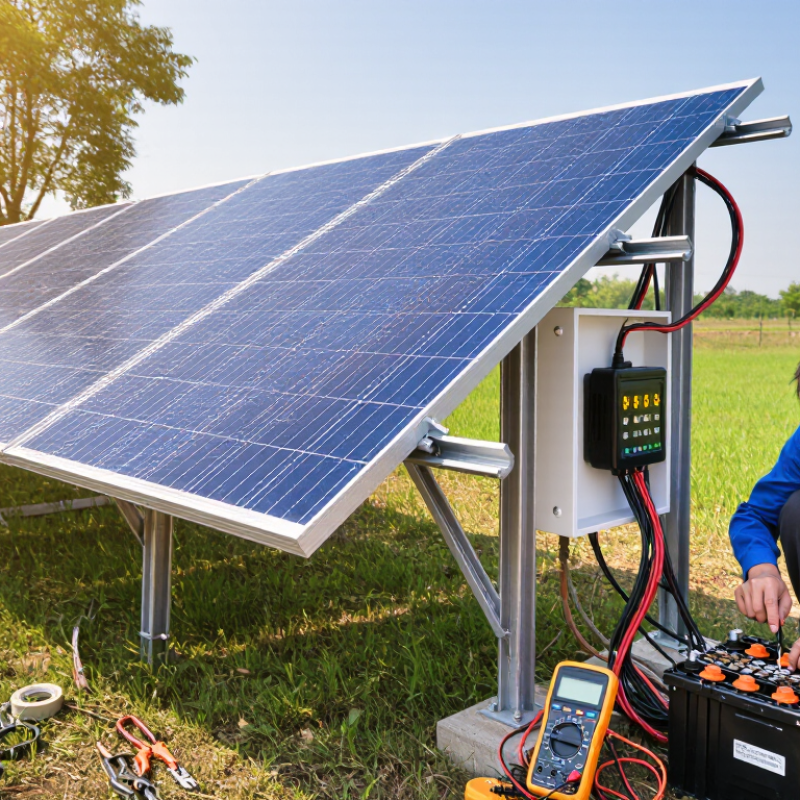
Top Reasons Your Solar Panel Is Not Charging the Battery?
How a Solar Panel Charging System Works
A solar charging system has three main stages. The panel produces direct-current electricity. The charge controller regulates its voltage and current. The battery stores the controlled energy for later use. An inverter may then convert stored power into household alternating current. If the battery receives no charge, the fault may sit anywhere in this chain. Shade, dust, winter angles, and cloudy skies can sharply reduce panel output. The International Energy Agency’s PVPS reports that solar performance depends strongly on local irradiance and system design. More sunlight does not always mean more stored energy.
The controller also needs correct voltage settings. A 12-volt battery still requires a higher charging voltage. Loose terminals, undersized cables, or corrosion create resistance and heat. Battery temperature matters, too. Many lithium systems stop charging when temperatures become unsafe. NREL research commonly reports photovoltaic degradation near 0.5% annually, although real systems vary. That figure is useful, but not a promise. A multimeter test can reveal more than a bright-looking panel. Sometimes the panel works. The battery does not.
Tips: Check panel voltage in direct sunlight. Inspect every connector and fuse. Confirm the controller’s battery type setting. Measure voltage at the panel, controller, and battery. If readings differ greatly, investigate cable loss or a damaged connection. Do not guess repeatedly. A wrong setting can waste a clear afternoon and still leave the battery empty.
| Possible Reason | What Happens in the System | Common Signs | Recommended Check or Action | Typical Impact |
|---|---|---|---|---|
| Insufficient sunlight | Solar modules produce less current when sunlight is weak or the sky is heavily overcast. | Low charging current during early morning, late afternoon, winter, or cloudy weather. | Check output around solar noon and compare it with the system’s expected operating conditions. | High |
| Shade on part of the panel | Trees, buildings, railings, or dirt can reduce the output of a module or an entire series string. | Charging improves when the shadow moves; output may fluctuate during the day. | Inspect the panel from morning to afternoon and remove avoidable obstructions. | High |
| Dirty or obstructed module surface | Dust, leaves, snow, bird droppings, or other deposits block light from reaching the solar cells. | Lower-than-usual output despite clear weather and no obvious electrical fault. | Visually inspect the surface and clean it according to the manufacturer’s safety instructions. | Medium to high |
| Incorrect wiring or polarity | Reversed polarity, an open circuit, or an incorrect series/parallel connection can prevent normal current flow. | Zero charging current, controller fault indication, or unexpected voltage readings. | Turn off the system as specified in the installation instructions and have connections tested by a qualified technician. | Critical |
| Loose, corroded, or damaged connections | Resistance at terminals, connectors, fuses, or cables limits current and may create heat. | Intermittent charging, warm connectors, discoloration, or voltage drop under load. | Look for corrosion or heat damage and arrange professional testing before replacing parts. | High |
| Charge controller fault or unsuitable setting | The controller regulates panel energy before it reaches the battery. A fault or wrong battery profile can stop charging. | Error code, no charging icon, incorrect battery type, or charging that stops too early. | Verify battery chemistry, system voltage, controller status, and programmed charge limits. | High |
| Battery is fully charged | A correctly configured controller reduces or stops current after the battery reaches its charge limit. | Charging current falls close to zero while the battery voltage remains near the charging set point. | Check the battery state of charge and observe whether charging resumes after a normal load is applied. | Normal behavior |
| Battery is deeply discharged or damaged | A severely depleted battery may require a controlled recovery process; an aged battery may not retain energy. | Voltage drops quickly, charging ends unusually soon, or the battery becomes warm or swollen. | Measure resting voltage and arrange a battery capacity or health test. Do not use a swollen battery. | Critical to high |
| Battery voltage does not match the system | A controller configured for a different nominal battery voltage may block charging or operate incorrectly. | Controller displays a voltage fault or fails to detect the battery. | Confirm that the battery bank, controller, inverter, and wiring are designed for the same nominal voltage. | Critical |
| Excessive electrical load | Connected appliances consume more power than the solar array can produce, so the battery continues to discharge. | The panel is producing power, but battery state of charge keeps decreasing. | Compare solar generation with load consumption and temporarily disconnect nonessential devices. | High |
| Temperature-related power reduction | Solar module voltage generally decreases as cell temperature rises, reducing usable power under hot conditions. | Output is lower on very hot days even with strong sunlight. | Allow airflow around the modules and compare performance with temperature-adjusted expectations. | Medium |
| Fuse, breaker, or isolator is open | A protective device or disconnected isolator interrupts the circuit between the panel, controller, and battery. | No current reaches the controller or battery even though panel voltage may be present. | Check the system status indicators and protective devices only as permitted by the installation manual. | High |
The panel produces direct-current electricity. The charge controller regulates voltage and current. The battery stores energy for later use. An inverter may supply household alternating current. A fault anywhere can stop charging.
Shade from a branch, vent, or nearby wall can reduce output sharply. Dust also blocks sunlight. Winter sunlight may arrive at a weaker angle. Clouds matter. Check the panel during clear midday sunlight.
Use a multimeter in direct sunlight. Follow the system manual and safe testing procedure. Compare the measured voltage with the panel’s expected open-circuit voltage. Zero voltage may indicate a damaged cable, fuse, connector, or panel. Low voltage may suggest shade or poor orientation. A bright panel can still fail electrically.
Loose terminals create resistance and heat. Corrosion can hide beneath a tight-looking connection. Reversed polarity may stop charging completely. Undersized cables can cause voltage loss. Inspect connectors, fuses, insulation, and cable ends. A warm connector needs attention.
Read its display or indicator lights. Confirm it detects both panel voltage and battery voltage. Check the selected battery type and charging settings. Incorrect settings can limit charging. They can also create safety risks. Do not guess repeatedly.
Yes. Aged cells may reach their voltage limit too quickly. The controller then reduces current or stops charging. A deeply discharged battery may also accept little energy. Measure voltage directly at the battery terminals. The controller screen may not tell the whole story.
Cold batteries may accept very little current. Excessive heat can activate internal protection. Some battery systems stop charging at unsafe temperatures. Check temperature readings and displayed fault codes. Never bypass protection controls. That shortcut can create a bigger problem.
An inverter, security device, or other load may drain energy overnight. The panel may restore less energy than the system consumes. Record battery voltage before sleep and after sunrise. Compare charging current at different times. A reset may help briefly. It may also hide a deeper fault.
Stop when voltage readings conflict or remain abnormal. Also stop after finding damaged insulation, heat, or repeated faults. A qualified technician can test capacity and insulation safely. Do not replace a fuse with a different rating. One test is not enough. I might blame the panel too quickly.
A solar panel charging system relies on sunlight, properly connected wiring, a charge controller, and a healthy battery working together. If the battery is not charging, common causes may include weak sunlight, dirt or shading on the panel, loose or damaged cables, incorrect connections, or a controller that is not receiving or regulating power correctly. Understanding each part of the system makes it easier to identify where the problem begins.
How to troubleshoot a solar panel not charging the battery? Start by checking the panel for dirt, cracks, and shading, then inspect all wiring, connectors, fuses, and terminals for damage or poor contact. Confirm that the charge controller displays normal input and charging activity. If the panel and wiring appear functional, test the battery for low voltage, aging, overheating, or internal damage, since a faulty battery may reject incoming energy. Minor issues can often be repaired by cleaning, tightening, or replacing damaged connections, while failed controllers or batteries may require replacement. Seek professional help when electrical readings are unusual or repairs are unsafe.

 Jamaica Light